Approval-Gated SOAR
The lab's automation does everything up to the decision. It enriches alerts, opens a case and recommends an action. A human makes the call in Slack. No workflow contains, blocks or disables anything on its own.
The 8 workflows (sanitized JSON)
How the pieces fit
flowchart LR
    W[Wazuh alert] -->|level ≥ 7, rule 510140| M[SOAR Master v2]
    W -->|brute-force rules 510120–510132| B[Brute Force v2]
    E[EVTX Hunter CLI] --> X[EVTX Hunter → TheHive]
    M --> EI[Enrich IP]
    M --> ED[Enrich Domain]
    M --> EH[Enrich Hash]
    M --> T[(TheHive alert)]
    B --> T
    X --> T
    M --> S[Slack approval card]
    B --> S
    S -->|analyst clicks| R[Response Handler]
    R -->|approved only| A[Scoped action: OPNsense block / AD disable]
The workflows
| Workflow | Triggered by | What it does | Where a human decides |
|---|---|---|---|
| SOAR Master v2 | Wazuh alert to a token-protected webhook | Normalizes, removes duplicates (Redis), classifies, pulls Splunk context, enriches observables through the three sub-workflows, gets a local AI triage note (Ollama), opens a TheHive alert, notifies Slack | Approval-tier alerts get a Slack approval card. Nothing is contained automatically |
| Brute Force v2 | Wazuh brute-force and spray rules (510120–510122, 510130–510132) | Safety gate (allow-listed rules, protected accounts), 15-minute de-duplication, TheHive alert (severity 4 for the possible-compromise rule 510132), Slack approval card | Approve the routine actions, approve a named-account exception, Reject, or Investigate, all in Slack |
| Response Handler | A button click on a Slack approval card | Verifies Slack's signature, checks the clicker is an authorized approver, takes a one-time approval lock, then runs only the approved, policy-permitted action. Updates Slack and logs to TheHive | The signed click is the authorization. Host isolation is disabled |
| Enrich IP / Domain / Hash | Called by SOAR Master v2 | Validates the observable, looks for recent sightings in Splunk and matches in MISP, and returns a normalized result | n/a (read-only) |
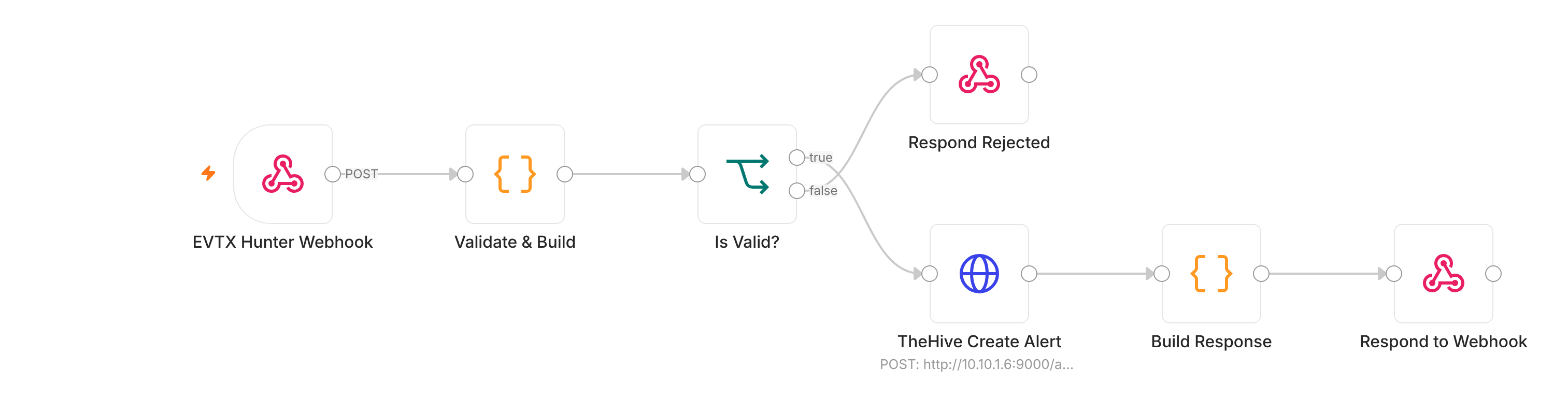
| EVTX Hunter → TheHive | The EVTX Hunter CLI | Validates the report, caps findings, opens one TheHive alert per report with a deterministic sourceRef (duplicates are refused) |
The analyst triages the alert. No response action |
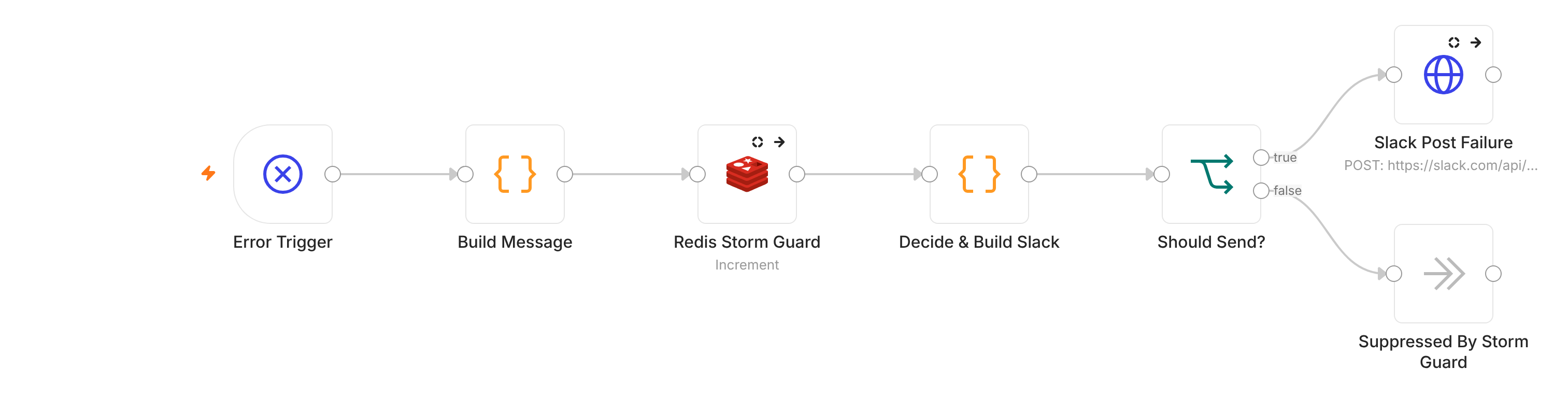
| Automation Failure Alert | Any of the seven workflows above failing (n8n Error Workflow) | Posts one short Slack message: workflow, failed node, trimmed error text, execution ID and time. No alert data. A storm guard sends at most one message per workflow and node every 10 minutes | The analyst follows up. The failed alert itself is still in Wazuh and Splunk |
What they look like in n8n
Each picture is the workflow's canvas, made from the published JSON file, so you can follow the flow without importing it. Click a picture to enlarge it, or open a Step by step box under the three main workflows: each follows one example alert through every step. The three big workflows also have an Open full size link: it opens the picture in a new tab, where you can zoom in on the labels.
SOAR Master v2

Step by step, with an example: SOAR Master v2
The story: on the lab workstation WIN11-PB026, the user jdoe runs
powershell.exe -ep bypass -File C:\Users\Public\update.ps1. Wazuh fires the lab's custom
rule with rule ID 510140 ("Suspicious PowerShell launched with ExecutionPolicy Bypass",
rule level 10 on Wazuh's 0–15 scale, rule groups powershell, execution_policy_bypass, windows) and sends the
alert here.
| # | Step | What it checks or does | In the example |
|---|---|---|---|
| 1 | Webhook | Receives the Wazuh alert through the token-protected proxy | The alert for rule ID 510140 from WIN11-PB026 arrives |
| 2 | Parse & Normalize | Pulls out rule ID, rule level, host, user, IPs, command line, domain, hash | Rule ID: 510140Rule level: 10Host: WIN11-PB026User: jdoeCommand line: powershell.exe -ep bypass -File C:\Users\Public\update.ps1IP address, domain, hash: none |
| 3 | De-duplication (Redis) | Has this exact alert arrived in the last 5 minutes? If Redis can't answer, stop (fail closed) | First time: continue |
| 4 | Classify Scenario | Sorts the alert into a scenario and severity using its rule groups and rule level. Rule level 7 or higher goes on to triage; lower gets a "low priority" reply | The rule groups include windows, and the rule ID 510140 starts with 510 (the lab's own custom rules) → scenario WINDOWS_HIGH. Rule level 10 is below 14 → severity high. Rule level 10 is 7 or higher → on to triage |
| 5 | Splunk context | Asks Splunk what else this host did in the last 30 minutes | Finds the other recent alerts from WIN11-PB026 |
| 6 | Enrichment | If the alert has an IP, domain or hash, calls the matching Enrich sub-workflow (Splunk sightings + MISP threat intel) | Nothing to look up → skipped |
| 7 | AI triage (local Ollama) | A local model writes a verdict, confidence and short summary. It cannot authorize anything | "Suspicious, 85% confidence, escalate" |
| 8 | Approval tier | Confidence 70% or more and "escalate" → an approval card. Otherwise manual only | 85% + escalate → approval card |
| 9 | TheHive alert | Opens the case with the summary, enrichment health and observables | Title: [SOAR] WINDOWS_HIGH: Suspicious PowerShell launched with ExecutionPolicy Bypass.Severity: 3 (high) |
| 10 | Slack notifications | Posts to the alerts channel, and also to the critical channel when severity is high or critical | Posted to both |
| 11 | Approval card | Buttons: Approve Allowed Actions, Reject, Investigate First. The only action it can ever allow is a firewall block of a source IP that MISP confirms as a known threat | No such IP → card says "Allowed containment: None". The analyst investigates |
The point of the example: the AI said "escalate", but the AI never decides what is allowed. Fixed code does, based on evidence (a MISP match). Had the alert come from an external IP listed in MISP, the card would have offered to block that one IP, and nothing else.
Brute Force v2

Step by step, with an example: Brute Force v2
The story: the lab's Kali machine (10.10.3.3, the controlled attack source) guesses
passwords for the test account jdoe on WIN11-PB026. After 8 failures in 2 minutes, Wazuh
fires the lab's custom rule with rule ID 510130 ("Behavior: Brute force detected",
rule level 12).
| # | Step | What it checks or does | In the example |
|---|---|---|---|
| 1 | Webhook | Receives only the 6 brute-force rule IDs (510120–510122, 510130–510132), through the token-protected proxy |
The alert for rule ID 510130 arrives |
| 2 | Normalize & Safety Gate | Skips the alert unless: the rule ID is one of the 6; the rule level is 10 or more; the account is not protected (administrator, admin, guest, krbtgt, root, or the SOC tool accounts wazuh, splunk, thehive, n8n), is not a computer account (a name ending in $) and is not missing; the source is a valid IPv4 address |
Rule ID 510130: allowedRule level 12: 10 or moreAccount jdoe: not protectedSource 10.10.3.3: valid IPv4→ all checks pass |
| 3 | De-duplication (Redis) | Has this exact event arrived in the last 15 minutes? If Redis can't answer, stop (fail closed) | First time: continue |
| 4 | TheHive alert | Opens the case. Rule ID 510132 (logon succeeded after brute force) gets severity 4, the other five get 3 |
Title: [REVIEW REQUIRED] Brute Force: jdoe from 10.10.3.3Severity: 3 |
| 5 | Approval card | No case ID from TheHive → no card. The card lists exactly what each button may do. An IP block is offered only for the controlled test IP 10.10.3.3 |
Card offers: block 10.10.3.3; disable jdoe if it is in SOC-SOAR-Disable-Eligible |
| 6 | Reply to Wazuh | Confirms receipt | Done. Nothing has been changed yet |
The four buttons: Approve Routine Actions, Approve Account Disable (Exception), Reject, Investigate. The story continues when the analyst clicks: see the Response Handler below.
Response Handler (Slack approval)

Step by step, with an example: Response Handler
The story continues: the approver @analyst clicks Approve Routine Actions on the
jdoe card. One second later a colleague clicks the same button.
| # | Step | What it checks or does | In the example |
|---|---|---|---|
| 1 | Acknowledge | Replies "OK" to Slack at once (Slack shows an error after 3 seconds) | Slack is happy |
| 2 | Verify the signature | Slack signs every click with a secret only n8n knows (HMAC-SHA256). Recomputed and compared in constant time; clicks older than 5 minutes are refused | Genuine and fresh: continue. A forged click would stop here |
| 3 | Known button? | Only the 4 approval buttons are accepted | Approve Routine Actions: OK |
| 4 | Approver? | The clicker must be on the approver list; anyone else gets "Unauthorized" in the thread | @analyst is on the list |
| 5 | One-time lock (Redis) | The first decision on a card wins; later clicks stop quietly | First click runs. The colleague's click stops here |
| 6 | Prepare Actions | Re-checks the card's policy: which actions are allowed, for which IP and account. Host isolation is always off | Block 10.10.3.3: allowed. Disable jdoe: allowed, routine mode |
| 7 | OPNsense block | Adds the IP to the firewall alias SOC_BRUTE_BLOCK |
10.10.3.3 is blocked |
| 8 | Live AD checks → disable | Looks the account up in Active Directory now and refuses if it is already disabled, flagged adminCount, has a service principal name, is in a privileged group, or (routine mode) is not in SOC-SOAR-Disable-Eligible |
jdoe passes → disabled |
| 9 | Update Slack + TheHive | Rewrites the card with ✅ / ❌ / ➖ per action and logs who approved what in TheHive | Card: ✅ Block IP, ✅ Disable account, ➖ Isolate host (skipped) |
What if jdoe had been added to Domain Admins after the alert? Step 8 refuses, nothing
changes in AD, and the failure alert tells the team why.
Enrich IP, Domain and Hash
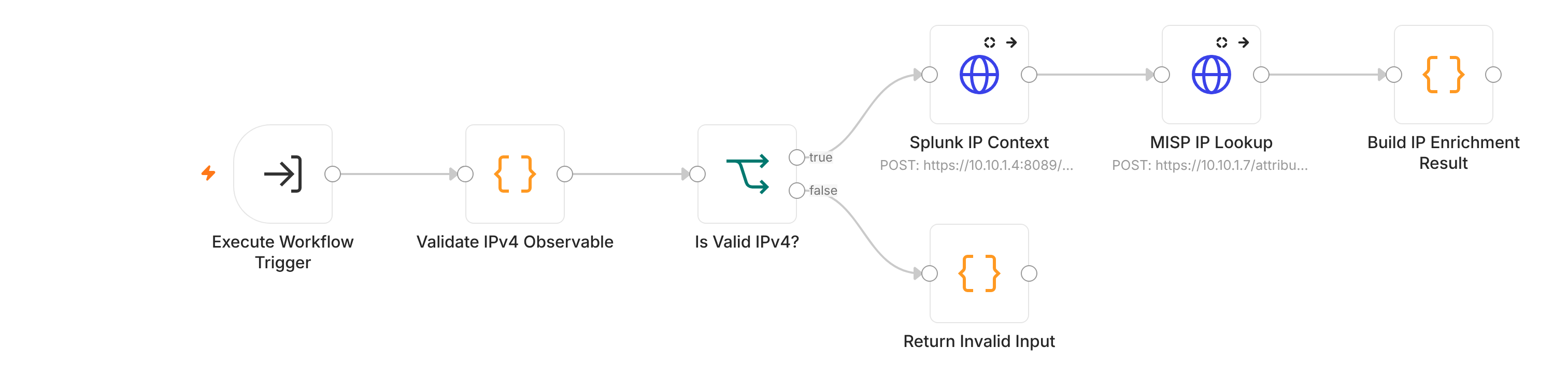
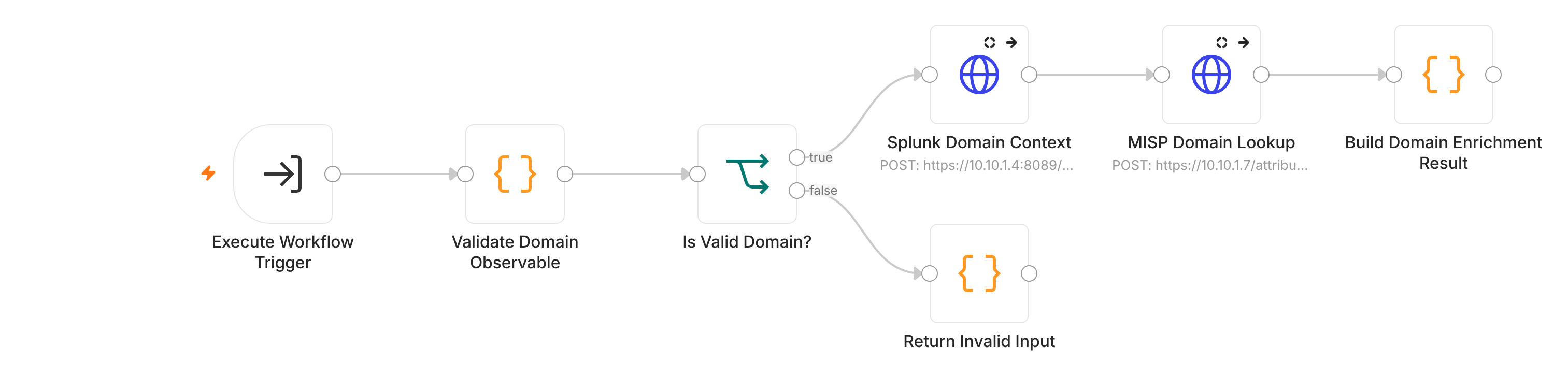
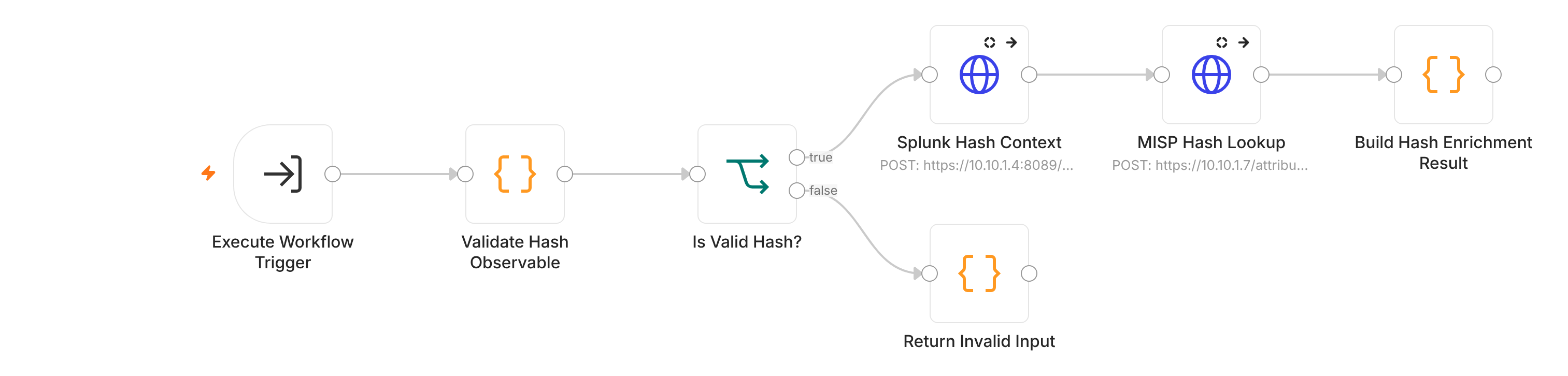
EVTX Hunter → TheHive
Automation Failure Alert
Design choices
- No automatic containment. A false positive would lock out a real user. And if repeated failed logins disabled accounts automatically, an attacker could fail logins on purpose to lock out the admins, turning the automation into a denial-of-service tool.
- Approvals are verified, not trusted. The Response Handler checks Slack's HMAC-SHA256 signature with a constant-time comparison and a 5-minute replay window, using a key stored outside the workflow. It then checks the clicking user against an allow-list.
- Blast radius is limited even after approval. There are two approval paths, and the
handler re-checks Active Directory live before any change:
- Routine: the account must be a direct member of
SOC-SOAR-Disable-Eligible. - Exception: a separate, explicitly labeled button for one named account outside that group. The analyst has to choose it on purpose.
- Routine: the account must be a direct member of
Both paths refuse:
- protected names (Administrator, krbtgt and others);
- svc_ accounts and any account with a service principal name;
- accounts flagged adminCount;
- members of privileged groups such as Domain Admins;
- accounts that are already disabled.
IP blocking is limited to the controlled simulation source. Host isolation is off.
- Each decision runs once. A Redis lock makes a second click on the same card a no-op.
- Failures are loud. The workflows fail closed: if a safety step like de-duplication can't
be verified, they stop instead of acting. Every one of them is wired to the Automation Failure
Alert, so a stopped run reaches Slack instead of sitting silently in n8n. The alert itself fails
open: if Redis is down, it still sends, because a missed failure alert is worse than a
duplicate one.
- De-duplication everywhere. The same alert arriving again within 5 minutes (SOAR Master)
or 15 minutes (Brute Force v2) does not create a new case. TheHive refuses a second alert with
the same sourceRef.
- Reusable enrichment. IP, domain and hash lookups are separate sub-workflows, so every
intake path enriches observables the same way.
How it was tested, honestly
- Each workflow was validated in the lab with synthetic alerts sent to its webhook. Each test confirmed the TheHive alert, the Slack card and the Reject path.
- The EVTX Hunter path was tested with real lab logs: one alert created, one duplicate refused.
- Still on the backlog: a full end-to-end brute-force test from the attacker zone, with Kali against a Windows login, then Wazuh, then n8n.
Publishing
The exports were cleaned with a sanitizer before publishing
(n8n-workflows/sanitize.py).
It removes IDs, credentials, Slack channel and user IDs, and anything that looks like a secret.
CI re-checks every published file. Lab IP addresses (10.10.x.x) are kept, because they are
fictional lab values.