Architecture
Network topology
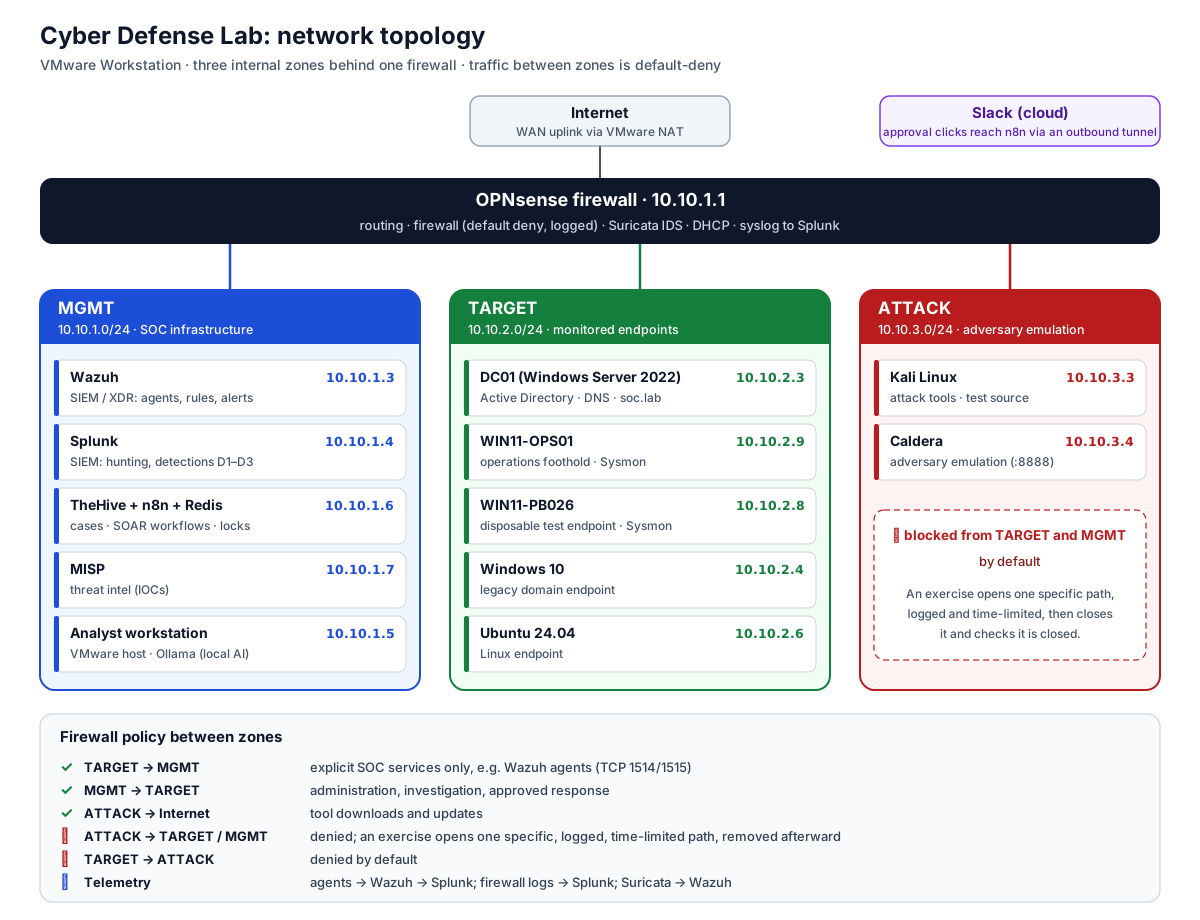
The whole lab runs on one workstation under VMware Workstation. Each zone is its own virtual network, and all traffic between zones goes through the OPNsense firewall, which sends its logs to Splunk. The workstation also runs the local AI model (Ollama) used for alert triage.
Security zones
| Zone | Purpose |
|---|---|
| WAN | Internet uplink for OPNsense |
| MGMT | SOC infrastructure: Wazuh, Splunk, n8n, TheHive, MISP |
| TARGET | Monitored endpoints: domain controller, Windows and Linux hosts |
| ATTACK | Kali and Caldera adversary systems |
Traffic between zones is default-deny. Paths opened for an exercise are logged and time-limited, then removed and checked closed afterward.
Data flow
flowchart LR
    E[Endpoints / AD / Ubuntu] --> W[Wazuh]
    W -- alerts --> S[(Splunk)]
    W -- archives --> S
    W -- high-severity --> N[n8n SOAR]
    N --> EN[Enrichment<br/>MISP · VirusTotal · AbuseIPDB]
    EN --> T[TheHive case]
    T --> SL[Slack: signed<br/>human approval]
    SL -- approved --> R[Scoped response]
    O[OPNsense / Suricata] --> W
O --> S- Two Splunk indexes from Wazuh:
wazuh(alerts) andwazuh_archives(every event). Archives are what make hunting for "logged but not alerted" activity possible. - Network telemetry takes two paths: Suricata → Wazuh, and OPNsense firewall logs → Splunk.
- Response is gated: n8n can enrich, open cases and recommend, but containment (for example disabling an account or blocking an IP) only runs after an authorized analyst approves it in Slack.